
Bookari Ebook Reader Premium4.2.4 - Get APK
You'll be able to download in few seconds.
Publisher Description
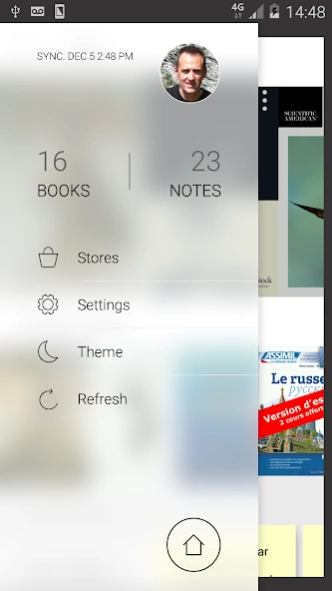
Ebook reader with synced bookshelves, annotations, TTS, dictionary, search
IMPORTANT NOTE: This application cannot be updated on Google Play since we do not have access to the 64-bits version of the Adobe RMSDK. As a consequence, we cannot publish here an Android 10 compatible version.
Please go to https://bit.ly/2V8k1aP to install it manually.
We apologize for the trouble but rest assured that we are doing our very best to develop a fantastic next generation of apps!
Legacy description:
User friendly, powerful, fast, with a synchronized library, this book reader provides unprecedented flexibility, speed, and reading comfort.
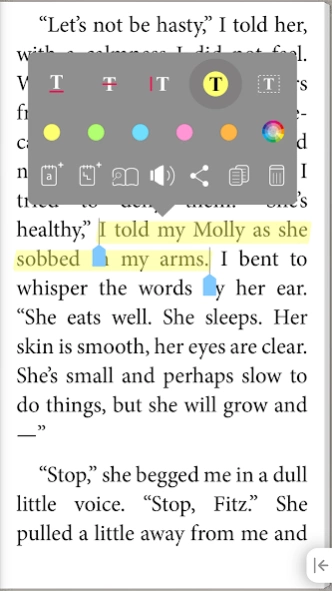
Highlight excerpts, take notes in your books, listen to them thanks to the vocal synthesis, organize your books and notes, add your favorite bookstores, and much more!
OVERVIEW
- Synchronized bookshelves: Switch between your phone and tablet and always find your books, reading positions, collections, tags, ratings, bookmarks, in their most recent state.
- Supports Adobe and Sony DRM, allowing you to read ebooks protected against hacking
- Customizable Stores section with integrated OPDS browser, and options to add links to your preferred bookstores
- Supports the most common ebook formats (EPUB2, PDF) as well as interactive multi-media books (EPUB3)
FLEXIBLE EBOOK READER
- Bookmark pages, highlight or underline text, add notes to a page or to a selected text
- Pin the navigation panel to display your notes next to the text
- Enjoy your PDFs even on smartphones thanks to the advanced PDF support, with lightning-fast vertical and horizontal scroll, Pan & Zoom
Advantages of the Premium version
- Listen to your books with the vocal synthesis
- Customize the display of EPUB books by creating your own themes, adjusting font, line height, colors, etc.
- Find quickly all occurrences of a word in a book with the advanced search function
- Create your own personalized table of contents by naming your bookmarks
- Create your own tailored lexicon progressively, filled with the words you searched in the dictionary
SYNCHRONIZED BOOKSHELVES
- Edit your book details in a very simple way: Title, author, language, publisher
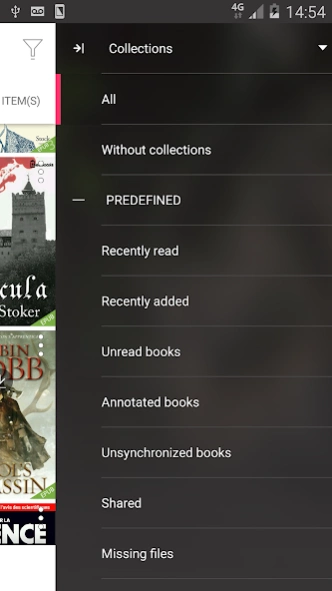
- Organize them in collections, manage their tags, and find them instantly with quick access filters (tags, authors, rating...) or with the search function
- Thanks to the synchronization functions, you will retrieve your organization on all your synced devices and even in the website interface of the Cloud
ADD BOOKS EASILY
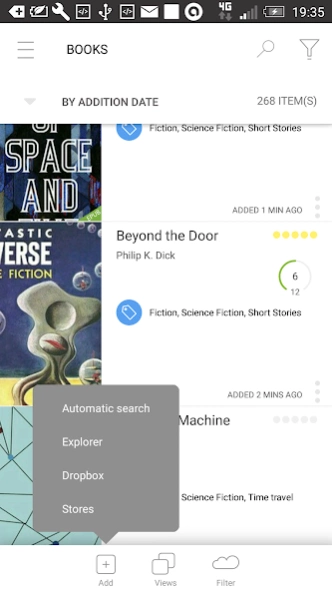
- Browse the preconfigured bookstores or the OPDS catalogs and websites you have added in the “My Stores” section.
- Scan all new books present on your device with the Automatic search
- Connect to your Dropbox account or navigate to a particular file with the Explorer
NOTEBOOK
- Retrieve the saved definitions and the notes taken in all your books in the notebook, organize them as in the bookshelves
A more detailed description of the complete Bookari platform here: http://www.bookari.com/
About Bookari Ebook Reader Premium
The company that develops Bookari Ebook Reader Premium is Mantano. The latest version released by its developer is 4.2.4.
To install Bookari Ebook Reader Premium on your Android device, just click the green Continue To App button above to start the installation process. The app is listed on our website since 2018-02-01 and was downloaded 0 times. We have already checked if the download link is safe, however for your own protection we recommend that you scan the downloaded app with your antivirus. Your antivirus may detect the Bookari Ebook Reader Premium as malware as malware if the download link to com.mantano.reader.android is broken.
How to install Bookari Ebook Reader Premium on your Android device:
- Click on the Continue To App button on our website. This will redirect you to Google Play.
- Once the Bookari Ebook Reader Premium is shown in the Google Play listing of your Android device, you can start its download and installation. Tap on the Install button located below the search bar and to the right of the app icon.
- A pop-up window with the permissions required by Bookari Ebook Reader Premium will be shown. Click on Accept to continue the process.
- Bookari Ebook Reader Premium will be downloaded onto your device, displaying a progress. Once the download completes, the installation will start and you'll get a notification after the installation is finished.
Program Details
System requirements
Download information
Pricing
Version History
version 4.2.4
posted on 2018-02-01
4.2.4
- Miscellaneous bugfixes
4.2.3
FIXED
- Freeze on download book from external browser
- Miscellaneous bugfixes
4.2.2
ADDED
- Pinch to increase/decrease font size in Epubs
- Bookari Store in Stores Section
- Support Android 8.0 Oreo adaptive icons
FIXED
- Support Dropbox API v2
- Miscellaneous bugfixes
version
posted on 2016-12-23
4.0.1 - 4.0.4,- Misc Bugfixes,4.0,Improved:,- Brand new look and feel,- Responsiveness,- Home page,- Selection in lists: long press on an item to enter selection mode,- Actions on a book are now also accessible in "Thumbnail" views through the "overflow menu",- Improved OPDS browser: galleries of related items are now displayed in each book details view,- Improved Epub 3 support, including page animations,- Improved text selection,Fixed:,- Misc bugfixes
version 2.3.18
posted on 2013-05-23
Several fixes and updates
Disclaimer
External Download
We do not host Bookari Ebook Reader Premium on our servers. We did not scan it for viruses, adware, spyware or other type of malware. This app is hosted by Galad and passed their terms and conditions to be listed there. We recommend caution when installing it.
The APK Download link for Bookari Ebook Reader Premium is provided to you by apps112.com without any warranties, representations or guarantees of any kind, so access it at your own risk.
If you have questions regarding this particular app contact the publisher directly. For questions about the functionalities of apps112.com contact us.
